
Download BulkGPT – AI‑Powered Bulk ChatGPT Automation Tool
Overview
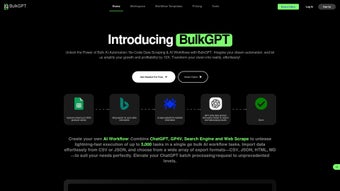
BulkGPT is a no‑code AI automation platform designed for professionals who need to run massive ChatGPT‑based requests without writing a single line of code. By leveraging OpenAI’s powerful language models, BulkGPT lets you upload CSV or JSON files, scrape web pages, and generate custom content at scale—all from a clean, cloud‑hosted dashboard. Whether you’re a marketer creating hundreds of SEO‑optimized product descriptions, a data analyst extracting social‑media insights, or an e‑commerce manager automating review sentiment analysis, BulkGPT turns repetitive, time‑consuming tasks into fast, asynchronous jobs that run in parallel. The tool supports multiple export formats (CSV, JSON, HTML, MD) and integrates smoothly with existing workflows through webhook and API hooks. In short, BulkGPT streamlines bulk data processing, content generation, and workflow orchestration while keeping the experience secure, reliable, and completely user‑friendly.
Key Features & Benefits
- Bulk Data Upload: Drag‑and‑drop CSV or JSON files up to 10 MB, and let the platform split the dataset into individual ChatGPT requests automatically.
- Asynchronous Cloud Processing: Jobs are executed in parallel on secure cloud workers, reducing total processing time by up to 80 % compared to sequential calls.
- Web Scraping Module: Built‑in scraper pulls structured data from any public webpage, cleans it, and feeds it directly into a ChatGPT prompt for enrichment.
- Custom AI Workflows: Use a visual flow builder to chain multiple prompts, add conditional logic, and export results in the format you need.
- Multi‑Format Export: Choose from CSV, JSON, HTML, or Markdown outputs; perfect for feeding data back into CMS, marketing automation, or BI tools.
- Task Dashboard: Real‑time monitoring, progress bars, and logs let you pause, retry, or cancel any job with a single click.
- Security & Compliance: All data is encrypted at rest and in transit; GDPR‑ready with optional self‑hosted token storage.
- Integration Hooks: Webhooks, Zapier, and native API endpoints let BulkGPT slot into existing pipelines without friction.
- Template Library: Pre‑built prompts for SEO product descriptions, email campaign copy, metadata tag generation, and sentiment analysis.
- Scalable Pricing: Free tier for up to 500 requests per month; paid plans unlock higher concurrency, priority processing, and dedicated support.
These features collectively empower teams to shift from manual copy‑pasting to automated, high‑volume AI output. The no‑code interface eliminates the need for developers, while the underlying architecture guarantees that each request respects OpenAI’s rate limits and token quotas. As a result, BulkGPT not only saves hours of repetitive work but also improves content consistency, reduces human error, and boosts overall productivity across marketing, sales, and data‑science functions.
Installation, Usage & Compatibility
Getting Started – No Installation Required
BulkGPT is a fully cloud‑based SaaS solution, which means you never need to install software locally. Simply visit bulkgpt.com, create a free account, and you’re ready to launch your first bulk job. The platform runs on modern browsers (Chrome, Edge, Firefox, Safari) and automatically detects your operating system. For users who prefer a desktop shortcut, a lightweight Electron wrapper is available for Windows 10/11, macOS 12+, and popular Linux distributions.
Step‑by‑Step Workflow
- Sign Up & Verify: Register with an email address, verify via a secure link, and link your OpenAI API key (or use the built‑in token manager).
- Upload Data: Click “New Job,” choose your file (CSV/JSON), and map columns to prompt variables (e.g.,
{product_name},{description}). - Choose a Template: Select a pre‑made prompt or craft a custom one using the rich text editor. You can embed variables, set temperature, and define max tokens.
- Configure Settings: Set concurrency level (1‑50 parallel threads), output format, and optional post‑processing scripts (JavaScript or Python snippets).
- Run & Monitor: Press “Start.” The dashboard shows real‑time progress, per‑task status, and any error logs. You can pause or cancel at any point.
- Export Results: Once completed, download the file in your chosen format or push it directly to a webhook endpoint for downstream automation.
Operating System Compatibility
BulkGPT is compatible with Windows 10/11, macOS 12+, Linux (Ubuntu 20.04+, Fedora 34+), Android 8+, and iOS 13+. The web interface adapts to mobile screens, and the Android/iOS apps provide push notifications for job completion, making it easy to manage tasks on the go.
Because the heavy lifting occurs in the cloud, local hardware requirements are minimal—just a stable internet connection and a modern browser. For enterprises with strict data residency rules, BulkGPT offers a private‑cloud deployment option that runs on AWS, Azure, or Google Cloud regions of your choice.
Pros, Cons & Frequently Asked Questions
Pros
- Zero‑code interface—anyone can launch AI‑driven bulk jobs.
- Parallel processing cuts execution time dramatically.
- Supports multiple input and output formats for seamless integration.
- Secure, GDPR‑compliant data handling with end‑to‑end encryption.
- Extensive template library accelerates common marketing and data tasks.
Cons
- Free tier limited to 500 requests per month, which may be insufficient for large teams.
- Advanced custom scripting requires basic JavaScript or Python knowledge.
- Reliance on OpenAI API pricing—costs can increase with high token usage.
FAQ
Can I use BulkGPT without an OpenAI API key?
Yes. BulkGPT offers a built‑in token manager that purchases API credits on your behalf. You can start with the free tier and upgrade when you need more capacity.
How does BulkGPT ensure data privacy?
All uploads are encrypted using TLS 1.3 during transit and AES‑256 at rest. Data is automatically deleted after 30 days, and you can enable a “no‑store” policy for extra compliance.
What is the maximum file size I can upload?
The standard upload limit is 10 MB per file. For larger datasets, you can split the file into multiple chunks or use the API endpoint to stream data directly.
Can I schedule recurring jobs?
Yes. BulkGPT includes a scheduler that lets you run jobs daily, weekly, or monthly. You can combine it with webhooks to pull fresh data automatically.
Is there a mobile app for monitoring jobs?
BulkGPT offers native Android and iOS apps that provide push notifications, job status overviews, and quick export options directly from your smartphone.
Overall Rating: 4.5/5 – BulkGPT excels at turning bulk data into AI‑enhanced output with minimal friction. The only drawbacks are the free‑tier limits and the need for a basic scripting skill set for highly custom flows.
Conclusion & Call to Action
BulkGPT bridges the gap between powerful language models and real‑world business needs, offering a secure, scalable, and entirely no‑code environment for massive ChatGPT requests. Its intuitive dashboard, robust feature set, and cross‑platform compatibility make it an indispensable tool for marketers, analysts, and developers alike. By automating repetitive content generation and data‑scraping tasks, you free up valuable human hours for strategic work that truly moves the needle.
If you’re ready to accelerate your workflow, improve SEO‑driven content production, and harness the full potential of AI at scale, download BulkGPT today. Start with the free plan, explore the template library, and experience how effortless bulk AI automation can be. For teams needing higher throughput or private‑cloud deployment, contact the sales team for a custom quote and enjoy priority support.



.png)



